The dashboard
A password-protected dashboard that shows where every client is this quarter. It works on your phone as well as your computer.
These screens are from the demo practice, Demo & Co Accountants. The clients and numbers in them are made up.
The quarter overview
Every client’s status this quarter, the emails they’ve been sent and their latest reply, on one page.
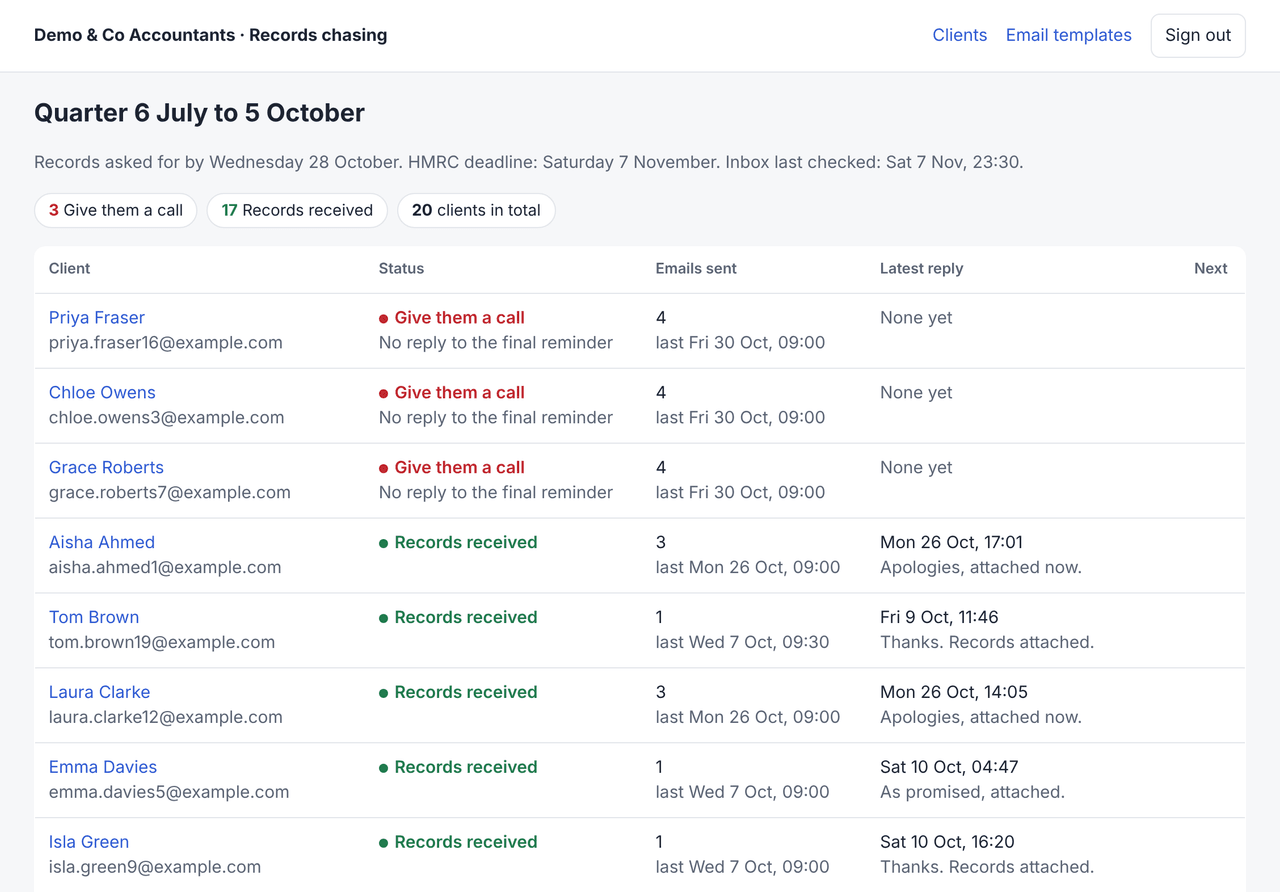
- Being chased
- Replied: check it
- Asked a question
- Give them a call
- Records received
Each client’s history
Every email sent and every reply, in order, with the date and time of each. When a partner changes a client’s status, that’s recorded too.


Records that arrive another way
Tick a client off when records arrive another way: by post, from another email address or through a portal. You can also pause chasing, or mark a client as not needed this quarter.
There’s a notes box for things like “called, will send Friday”.
Your 4 emails
Edit the wording and approve it. Each email shows when it’s sent and who approved it. Nothing is sent until all 4 are approved.

Try it free for 7 days
Then it’s £150 a month for your practice, however many MTD clients you have, and you can cancel at any time. Book a 15-minute call to get started.
Or ring 07398 895787